

If you already have an Apple Watch that you’re using to track your workouts, then is it worth it to upgrade to the new Apple Watch Ultra 4?
For this Apple Watch Ultra 4 review, I wanted to find out how much better the battery life really was, how workout tracking compared with my older watch, and whether the sleep and recovery information was useful.
As a certified personal trainer and coach with over 20 years of experience, I wanted to know whether the Ultra 4 makes training and everyday use easier. I paid $799 plus tax and tested it through workouts, overnight wear, and battery and charging checks.
Here’s what made the upgrade worthwhile for me, and what I’d consider before replacing an older Apple Watch.
Apple Watch Ultra 4 Review in Short
Quick Verdict: Battery life is the biggest reason I’d upgrade from an older Ultra. I got more than two days from a full charge in my logged test, and quick charging makes top-ups convenient. Heart-rate averages were close to my Polar H10 in the workouts I tested, but I still noticed lag during intervals. Sleep and Readiness add useful context, although the scores didn’t always match how I felt.
Best For:
- iPhone users upgrading from an older Apple Watch.
- Longer battery life and more time between charges.
- Improved overnight sleep and recovery tracking.
- A “mini iPhone” on your wrist for calls and music without carrying your phone.
Not Ideal For:
- People who need a week or more between charges.
- Anyone relying on a sports app workflow that doesn’t work well on Apple Watch.
- People with wrist tattoos should check compatibility first (I’ve heard mixed results).
Biggest Strength:
- Outstanding battery life (easily 2+ days on a charge) and fast charging.
- The new S11 processor makes everything feel faster and smoother.
- Bright, large display for checking workout metrics.
- Heart-rate averages close to my Polar H10 in the workouts I tested.
- Useful new Readiness and Recovery score.
Biggest Weaknesses:
- Expensive and hard to justify for everyday users who may not use the Ultra features.
- Not a dramatic upgrade from Ultra 3—mostly battery and speed improvements.
- Bigger and bulkier than Series 12, especially for sleeping.
- Heart-rate tracking still has gaps and lags during intervals.
- Battery life still trails dedicated sport watches.
- Some announced health features weren’t available during my review.
- I’m skeptical of Health Age.
Pros and Cons
Pros
- Long battery life with convenient charging top-ups
- Strong heart-rate tracking with a promising new sensor
- More frequent heart-rate and HRV measurements
- Useful recovery and readiness feedback
- Bright, large display for checking workout metrics
- Rugged titanium build with a handy Action button
- Fitness tracking, payments, calls, and music in one watch
- Smooth integration with the iPhone and Apple ecosystem
Cons
- High price compared with the Series 12
- Bulky for overnight wear and smaller wrists
- Limited upgrade value over the Ultra 3
- Occasional heart-rate recording gaps and lag
- Shorter endurance than dedicated sports watches
- Some sports workflows need extra apps or customization
- Some advertised features weren’t fully available at review time
- Siri can still be unreliable

- More time tracking. Less time charging.
- 2+ days of battery life in my testing, with fast charging top-ups.
- Useful workout, sleep, and recovery insights.
- Calls, music, and payments from your wrist.
- Best for iPhone users upgrading from an older Apple Watch.
Workout Tracking & Accuracy
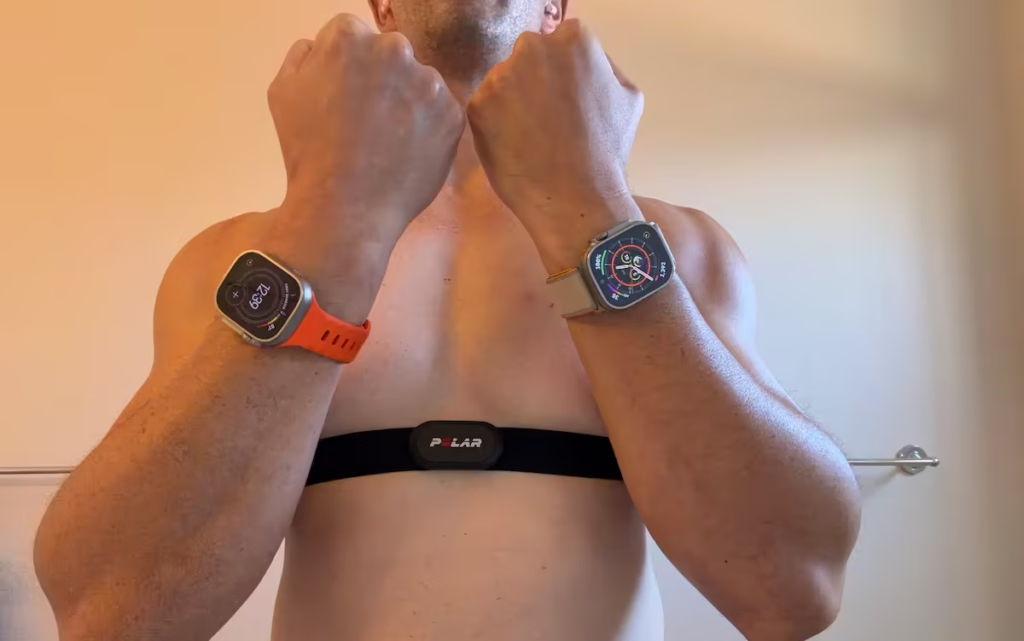
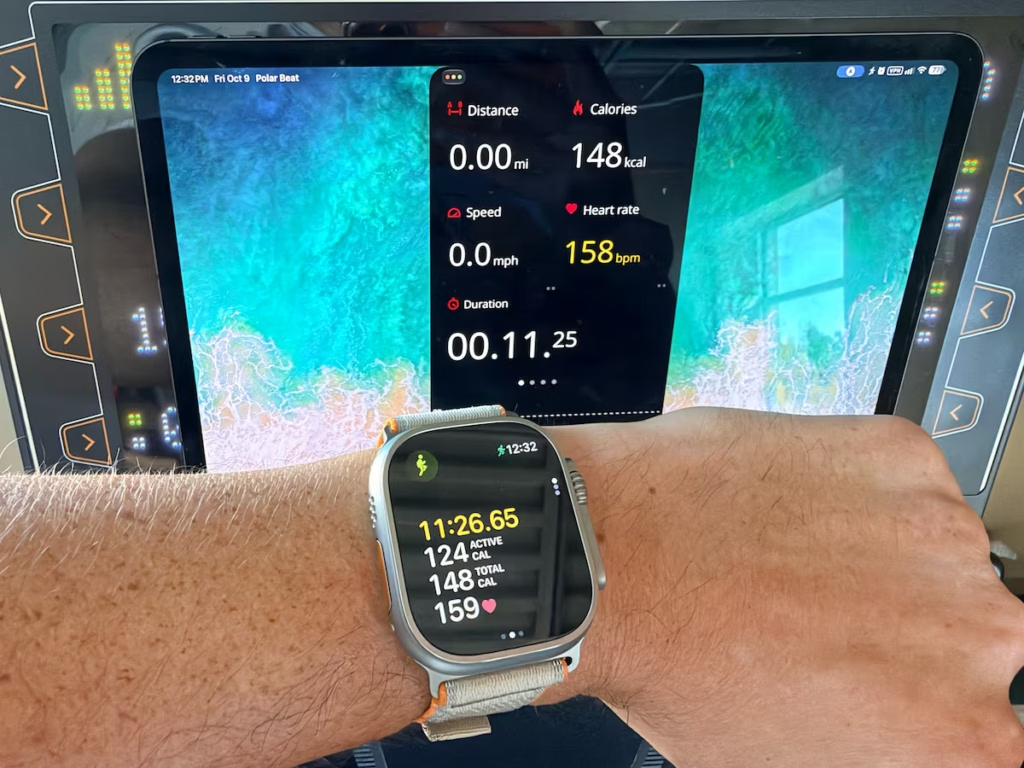
On October 9, I tested the Apple Watch Ultra 4 during two HIIT workouts and a strength-training session against the Polar H10. I also wore my Ultra 2 on the opposite wrist for the watch comparison. The photos below show the setup, a live reading, and the completed workout summaries.
Workout Test Results at a Glance
| Test | Ultra 4 | Comparison | Context |
|---|---|---|---|
| Lifting: heart rate | 109 bpm average — October 9 session | Polar H10: 109 bpm average; 134 bpm maximum | About 31 minutes; slightly different recording windows. Per-reading error not calculated. |
| Arm-focused lifting: heart rate — October 10 | 93 bpm average; 30:02 | Ultra 2: 93 bpm; Polar H10: 92 bpm | Each watch recorded its own heart rate; Polar H10 recorded through Polar Beat on my iPad. No clear Ultra 4 advantage at the summary level. |
| Arm-focused lifting: calorie estimates — October 10 | 155 active kcal; 217 total kcal | Ultra 2: 157 active kcal; 220 total kcal. Polar app: 145 kcal displayed. | About 30 minutes. Polar’s calorie definition is not confirmed, so its figure is not a like-for-like comparison. None of these estimates validates actual energy expenditure. |
| Elliptical: calorie estimates — October 13 | 204 active kcal; 246 total kcal | Ultra 2: 210 active kcal; 252 total kcal. Polar app: 242 kcal displayed. | About 20 minutes. Apple Workout: Elliptical; Polar: Other indoor. Polar’s screenshot does not distinguish active from total calories; estimates are not a lab reference. |
| Walking pad: steps | 4,328 | Ultra 2: 4,322; ankle pedometer: 4,322 | 6 more steps than either comparison device. Duration and an independent manual count were not documented for this trial. |
| Outdoor run GPS — October 17 | 1.97 miles | Ultra 2: 1.93 miles; Google Maps trace: 1.93 miles | Ultra 4 was 2.1% above the manual map estimate. Ultra 2 stopped later; no clear GPS upgrade shown by this run. |
The Apple Watch Ultra 4 worked well for my regular training, but my comparisons didn’t show a clear accuracy leap over the Ultra 2. The strongest results were close workout heart-rate averages and walking step counts. Fast-changing intervals and elliptical step counting were less convincing.
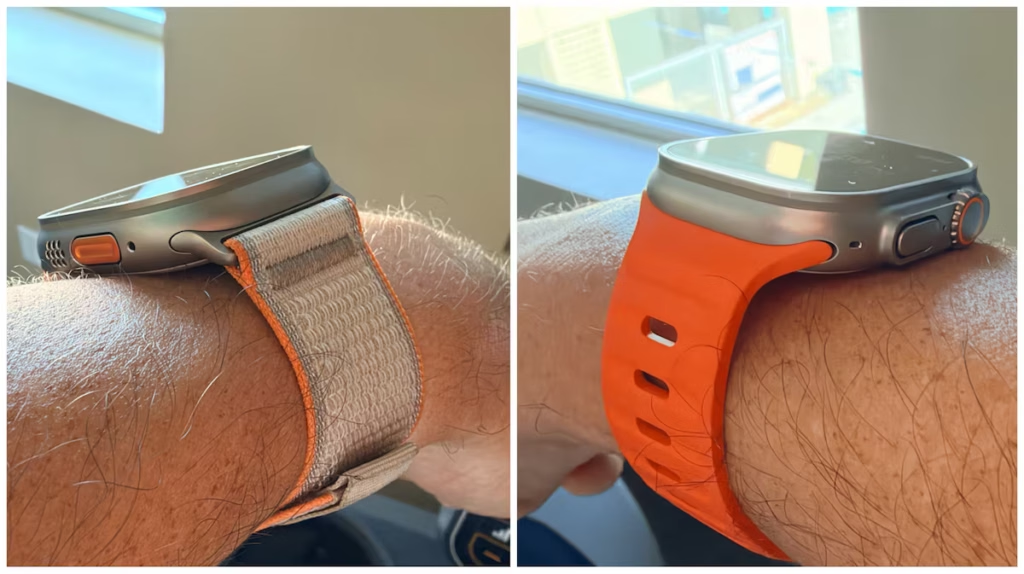
For the watch comparison, I wore the Ultra 2 and Ultra 4 on separate wrists. The photos show the placement and bands I used. Because the bands and wrists differed, I treated fit as part of the testing context when comparing the readings.
What Changed in the Heart Rate Sensor?
The heart rate sensor is for sure the most significant of the hardware upgrades in the Ultra 4. It has a new optical and electrical heart rate sensor that it also shares with the Series 12 Apple Watch.
Apple states that the new sensor samples heart rate every 5 seconds throughout the day. That’s up from every 5 minutes with the Ultra 3. And the HRV updates every 5 minutes, which Apple says is 24 times more frequent than previous generation.
I pay attention to my HRV, so having more frequent updates interests me. HRV describes variation in the time between heartbeats. I use it as context alongside how I feel, and more readings do not by themselves establish better accuracy.
Heart Rate During Lifting & Intervals
It’s pretty easy these days for a heart rate tracking to accurately measure a steady state run or walk. But the real differentiator will be with how well it measures heart rate during strength and high intensity intervals.
These are the movements where a wrist-based optical heart rate sensor is going to be more stressed by the rapid movement changes, wrist flexion, and muscle contractions that can interfere with blood flow at the measuring site.
Weightlifting Testing Results
In an additional strength-training session on October 9 lasting about 31 minutes, the Ultra 4 and Polar H10 both reported an average heart rate of 109 bpm. Polar reported a maximum of 134 bpm, and the Apple workout graph also shows an upper value of 134 bpm. The summaries show similar overall rises and falls through the session.
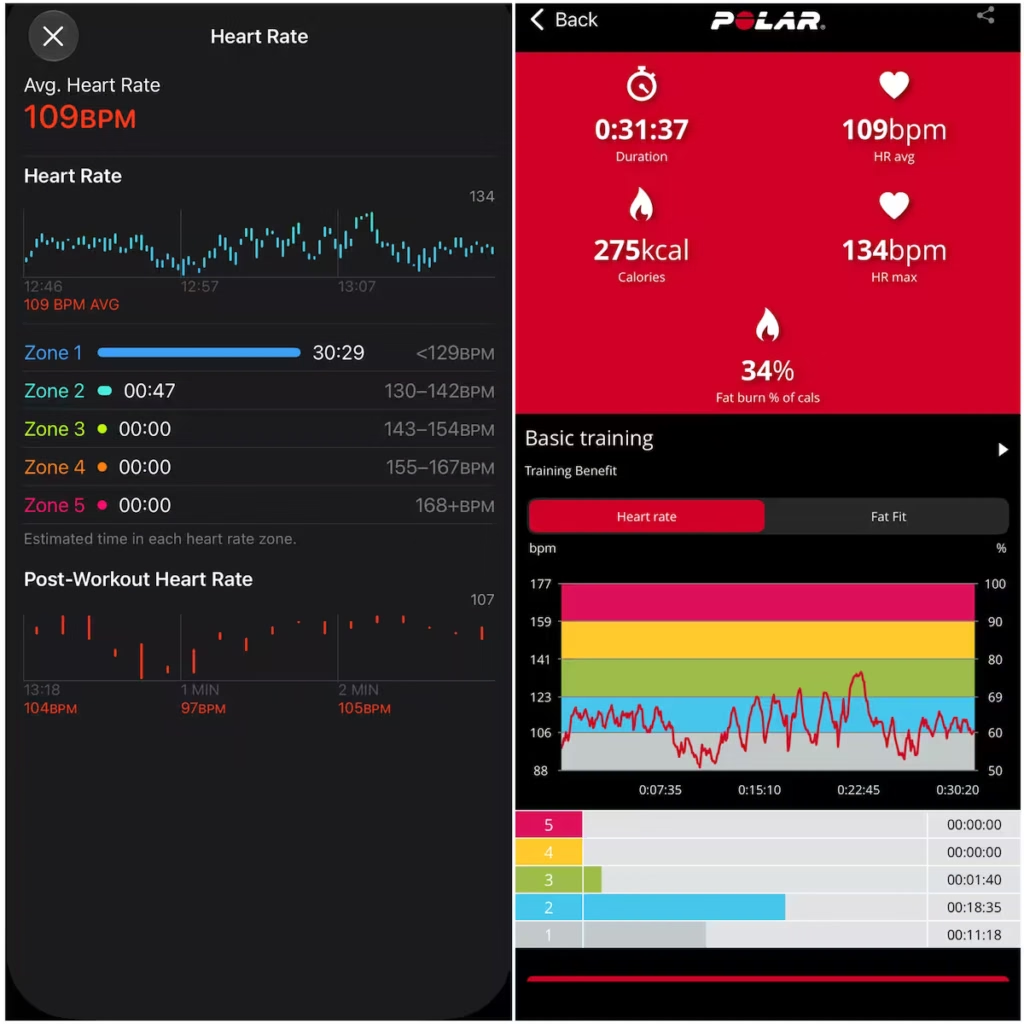
Similar workout averages can conceal missed peaks, brief gaps, and lag between sets. These comparisons use app summaries and screenshots; measuring error at each moment would require synchronized, timestamped recordings.
Arm-Focused Strength Test: Does Strong Gripping Affect Tracking?
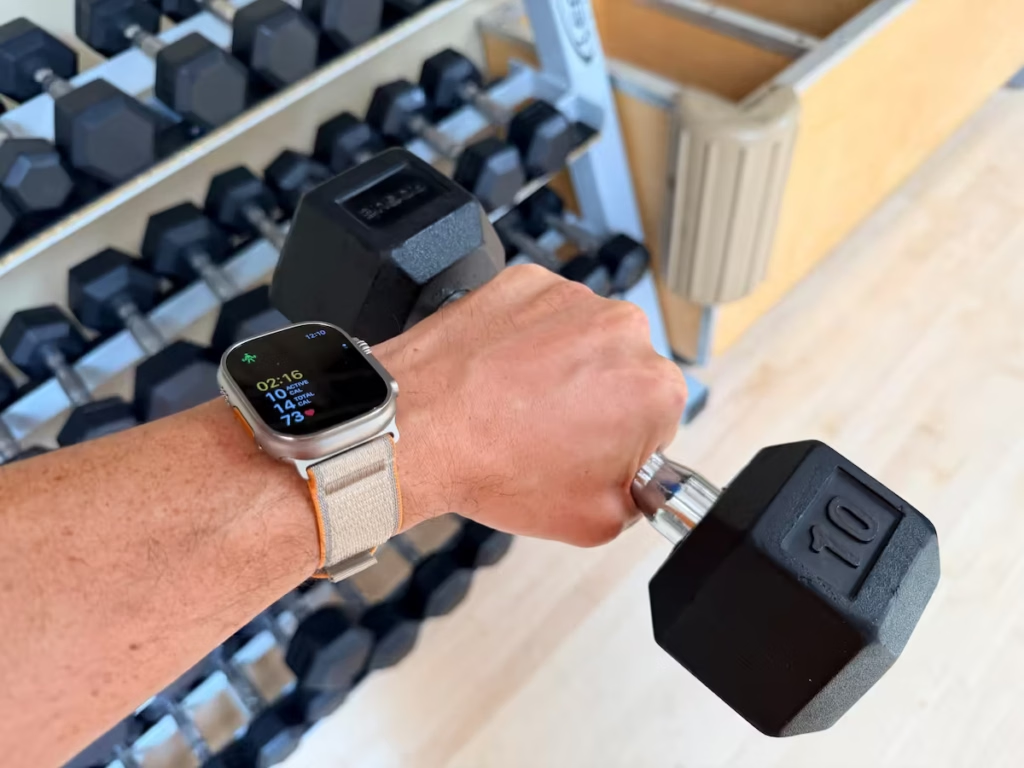
On October 10, I compared the Ultra 4, Ultra 2, and Polar H10 during an approximately 30-minute arm-focused strength workout. I was strongly gripping weights throughout the working sets, making this a useful real-world test of how the watches handled an arm-heavy lifting session.
Apple Watch Ultra 4
Polar H10 + app
Apple Watch Ultra 2
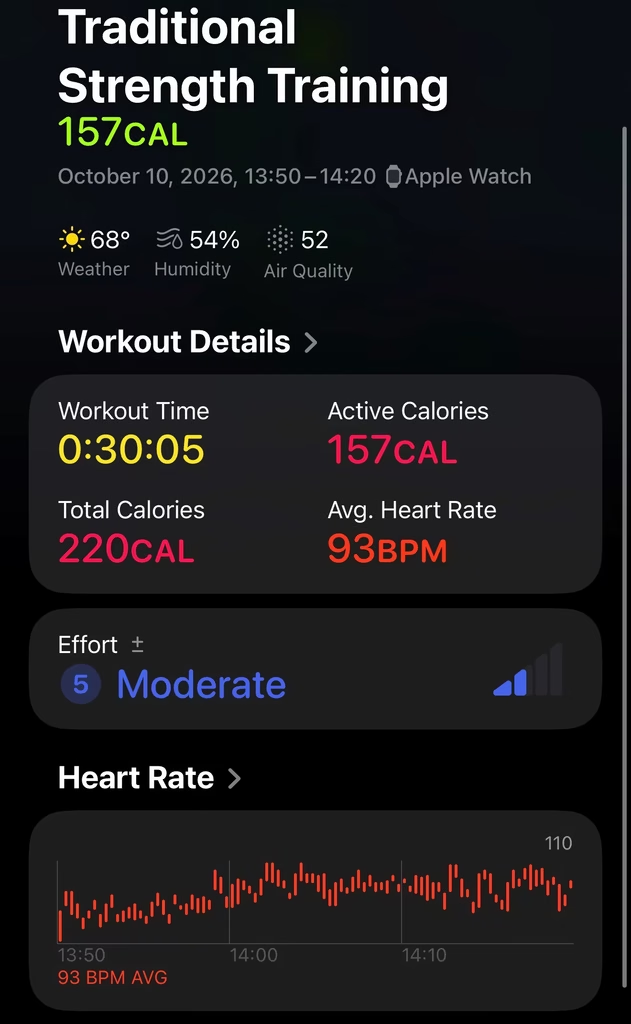
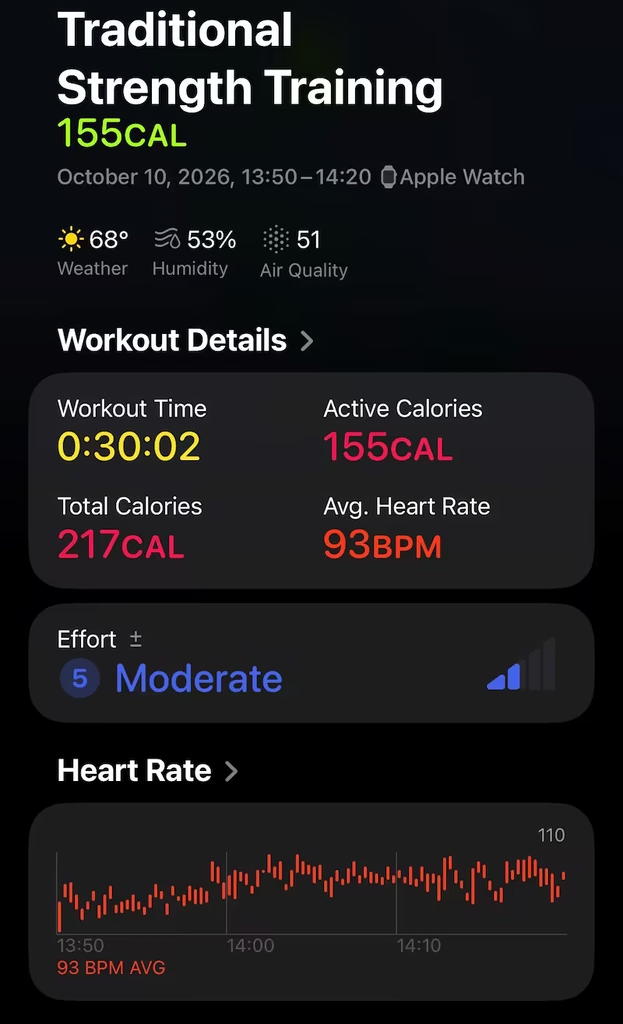
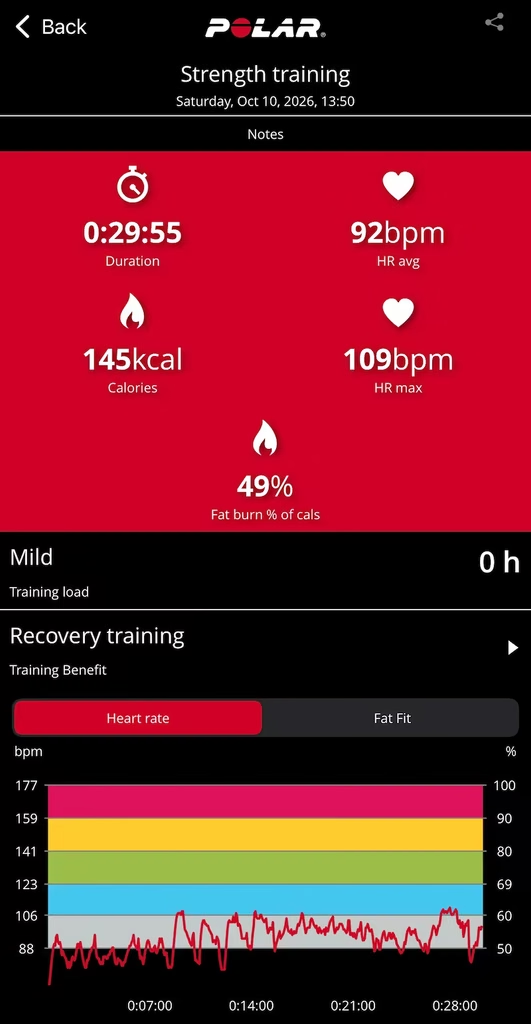
October 10 arm-focused strength session. Click a screenshot to enlarge. Recording durations differed by up to 10 seconds; similar averages do not establish agreement at every moment. The Polar graph also uses a different scale.
| Measurement | Ultra 4 | Ultra 2 | Polar H10 + app |
|---|---|---|---|
| Recording duration | 30:02 | 30:05 | 29:55 |
| Average heart rate | 93 bpm | 93 bpm | 92 bpm |
| Active calories | 155 kcal | 157 kcal | Not separately labeled |
| Total workout calories | 217 kcal | 220 kcal | 145 kcal displayed; definition not confirmed |
The session averages were very close. Both Apple Watches averaged just 1 bpm above the Polar H10. All three summaries followed the same broad pattern: lower heart rates early in the workout, a rise around nine minutes, and generally higher readings afterward. Strong gripping did not produce a large difference in the overall averages in this session.
Polar’s graph showed more pronounced short-term rises and recovery dips than the Apple summaries. Different graph styles and scales prevent me from attributing that difference to smoothing, sampling, missed readings, or lag—or isolating gripping as the cause.
The H10 supplies heart-rate data; the Polar app calculates the calorie estimate. Its 145 kcal result is not separately labeled as active or total in this screenshot, so I am keeping it separate from the Apple calorie fields rather than treating it as an equivalent measurement or a reference for true calories burned.
My takeaway: Both watches stayed close to the chest strap at the summary level, with no clear Ultra 4 advantage during this arm-focused session. Their active-calorie estimates differed by only 2 kcal.
For the heart-rate comparisons, my Polar H10 recorded through Polar Beat on my iPad. I deliberately kept it off my iPhone, and each watch recorded its own heart rate.
Interval Testing Results
For the HIIT tests, I started with a warmup walk, then alternated 2 minutes ON with 2 minutes OFF. During the ON intervals, I ran at 8 mph with the treadmill incline set to level 3. This let me compare how the readings responded as my effort increased and then eased during recovery.
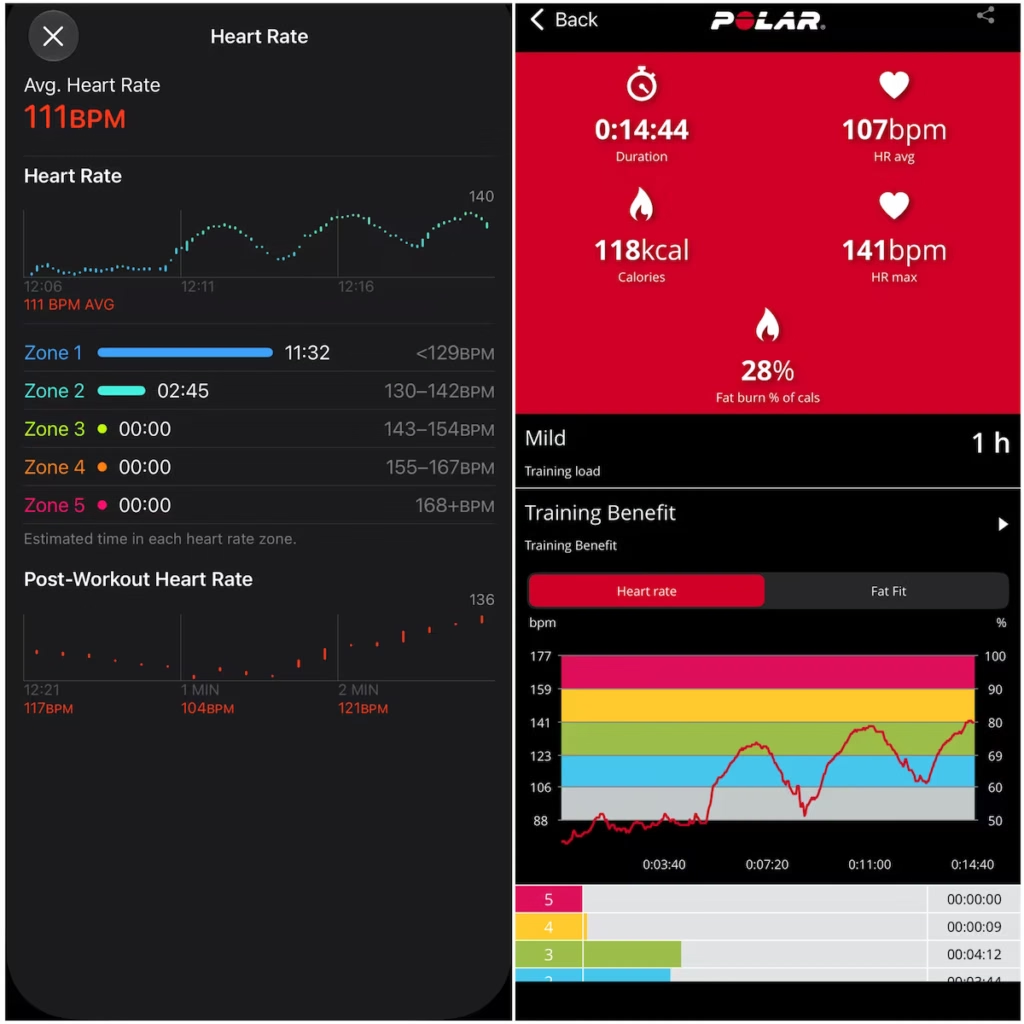
HIIT workout 1: The Ultra 4 reported an average of 111 bpm, compared with 107 bpm from the Polar H10. Apple recorded 14:35 and Polar recorded 14:44, so the recording windows differed slightly. Both graphs show the broad interval pattern, although the averages were 4 bpm apart.
HIIT workout 2: Both devices recorded 17:43 and an average heart rate of 127 bpm. Polar reported a maximum of 160 bpm, matching the upper value shown on the Apple graph. The three main rises and the recovery afterward are visible in both summaries. This was the closer match of the two HIIT sessions at the summary level.
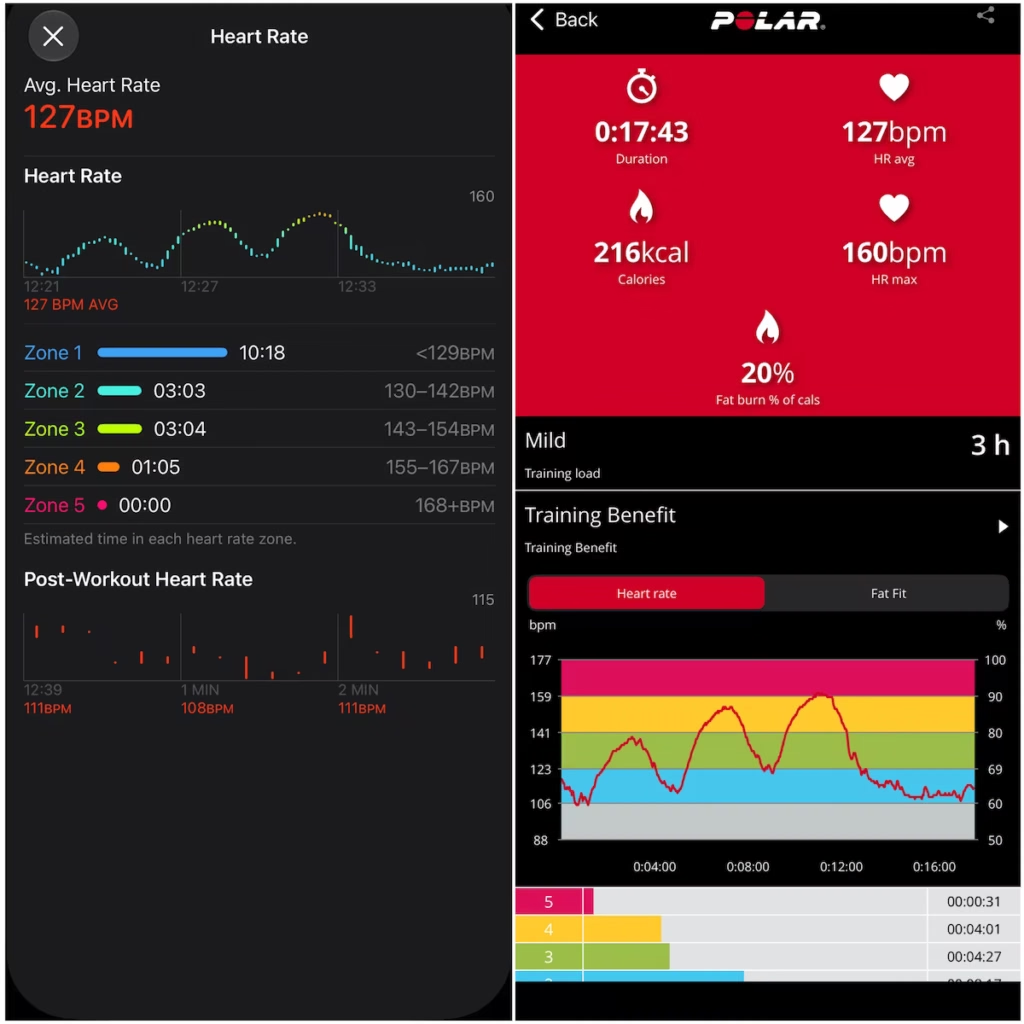
The apps use different heart-rate zone thresholds and graph scales, so I compared the readings and overall pattern rather than the colored zones or time in each zone. These are side-by-side app summaries; assessing second-by-second lag, missed peaks, or recording gaps requires the original timestamped data.
The difference I noticed most during HIIT was how quickly the live readings responded when I started a hard interval. As I increased my intensity, the Polar H10 reading rose in line with the effort. The Ultra 4’s displayed heart rate lagged behind and took roughly 5–15 seconds to catch up. I noticed a similar catch-up delay as my effort dropped during recovery. These were observations while checking the live displays, rather than delays calculated from synchronized recordings.
I also noticed the watch’s displayed reading updating at roughly five-second intervals. That could contribute to how delayed the number feels, but a display refresh interval is not necessarily the same as the sensor’s underlying sampling rate. I can’t determine the cause of the 5–15-second catch-up delay from these photos. For short intervals, the practical issue was that the Polar reading reflected the rise sooner, even when the completed workout averages matched.
Independent Testing: Conditions & Heart Rate Data Sources
The workout averages were close to my Polar H10 in the sessions I tested, although I still noticed lag during intervals. I tested in late summer and early fall in a dry, hot climate with temperatures around 80 to 90 degrees. I have not tested whether the same results hold in colder conditions.
I did not wear the AirPods Pro 3 nor the PowerBeats Pro 2 headphones that have heart rate tracking. I did not want them to contribute heart rate data that can compromise the results of the lifting and interval comparisons. So these were a clean test.
Calorie Estimates
I treat the calorie numbers as estimates. In the arm workout, the watches reported 155 and 157 active calories; on the 20-minute elliptical test, they reported 204 and 210. Those are close estimates, but I didn’t measure actual energy expenditure in a lab.
How to read the calorie comparison
These are device and app estimates. Similar numbers show agreement between estimates; they do not establish how many calories were actually burned.
Step Counting Accuracy
On a walking pad, I got 4,328 steps using the Apple Watch Ultra 4 against 4,322 on the Ultra 2. And a 3D Tri-Axis accelerometer technology pedometer I had attached to my hip got 4,322.
I kept my phone stationary on the machine to avoid adding phone-recorded steps.
Treadmill Step Test: Comparison with a NESKLA Pedometer
For a separate treadmill walk targeting about 1,000 steps, I wore a NESKLA 3D pedometer on my hip and compared its count with both watches. The NESKLA uses a 3D tri-axis sensor; I used its reading as the comparison rather than a manual step count. The Ultra 4 recorded 996 steps, the Ultra 2 recorded 982, and the hip pedometer recorded 1,009.
| Device | Recorded steps | Difference vs. NESKLA |
|---|---|---|
| Ultra 4 | 996 | −13 (−1.3%) |
| Ultra 2 | 982 | −27 (−2.7%) |
| NESKLA hip pedometer | 1,009 | Comparison reference |
The Ultra 4 agreed more closely with the NESKLA in this trial: 13 fewer steps, compared with 27 fewer for the Ultra 2. Without an independent manual or video count, I cannot determine which device was closest to the actual number of steps.
Walking Pad Use While Typing
I do have a walking pad under a stand-up desk that I work from on my computer sometimes. And my Ultra 2 definitely did not record steps while my hands were on a keyboard resting on the desk.
But I found the Ultra 4 was able to register steps on the walking pad even with my hands resting on the desk. For me, that is a useful quality-of-life improvement.
Hands on the Desk: My 300-Step Test
To check this more closely, I manually counted 300 steps while walking on my treadmill pad with my hands resting on the stand-up desk. I had an indoor workout recording on the Ultra 4 during the test.
| Measurement | Result |
|---|---|
| Watch step total before (12:25) | 1,664 |
| Watch step total after (12:29) | 1,962 |
| Increase in watch step total | 298 steps |
| My manual count | 300 steps |
| Difference from my count | 2 fewer steps (about 0.7%) |
The watch total increased by 298 steps compared with the 300 I counted. That is only two steps short, which is a very close match in this trial. The screenshots show daily totals before and after; 298 is the difference between them, not a separate workout step total.
What I measured: walking with my hands on the desk
The Ultra 4 counted 298 of my 300 manually counted steps with my hands resting on the desk and an indoor workout running. That supports its usefulness in this setup. This trial did not test active typing, workout-off use, or full-day accuracy, and I did not record a matching Ultra 2 count.
Elliptical Strides & Step Counts
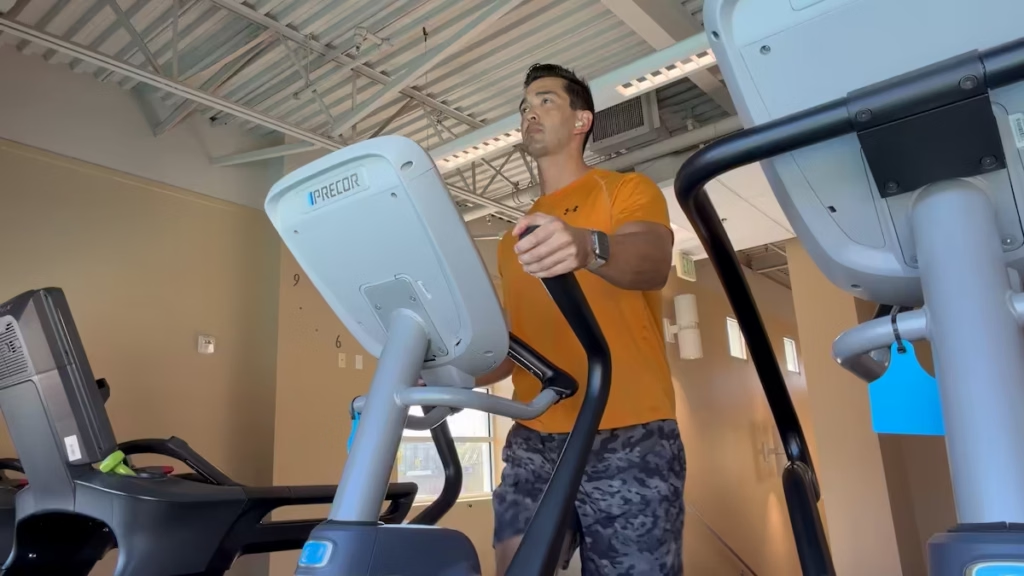
I often do the elliptical machine at the gym for cardio and I was a little disappointed that the Ultra 4 wasn’t registering steps with each stride. To be fair, an elliptical stride isn’t a step per se, but I like to count them towards my daily step goal because it is a similar movement.
My Ultra 2 has generally counted far more elliptical movements as steps than my Ultra 4. The repeat test below confirmed a substantial difference, although I have not established what causes it.
I tried recalibration and initially thought Indoor Walk might help register elliptical movements. In the follow-up test below, it still left a substantial gap between the watches.
20-Minute Elliptical Test: Heart Rate Matched, Step Counts Did Not
On October 13, I repeated the comparison for approximately 20 minutes using Elliptical in Apple’s Workout app on both watches. The Ultra 2 counted 3,245 steps, while the Ultra 4 counted 217—3,028 fewer, or about 93.3% fewer than the Ultra 2.
This supports my earlier observation that the Ultra 4 credits far fewer elliptical movements as steps. It did register some steps, so saying it recorded none would overstate the result.
| Measurement | Ultra 4 | Ultra 2 | Polar H10 + app |
|---|---|---|---|
| Workout duration | 20:07 | 20:11 | 20:00 |
| Steps recorded | 217 | 3,245 | Not supplied |
| Average heart rate | 127 bpm | 127 bpm | 127 bpm |
| Active calories | 204 kcal | 210 kcal | Not separately labeled |
| Total calories | 246 kcal | 252 kcal | 242 kcal displayed* |
The heart-rate results told a different story from the step counts: all three reported the same 127 bpm average. Each graph showed a quick initial rise, followed by a more gradual increase through the session. Polar reported a maximum of 138 bpm; both Apple heart-rate charts displayed an upper value of 138 bpm.
The Ultra 4 estimated 6 kcal less than the Ultra 2 in both active and total calories. Polar’s 242 kcal was numerically close to the watches’ total estimates, but its screenshot does not label the calorie definition, so this is not a confirmed like-for-like comparison.
Does Indoor Walk Mode Fix Elliptical Step Counting?
I also tried Indoor Walk in Apple’s Workout app while continuing on the elliptical, following a suggested workaround. The Ultra 2 recorded 751 steps and the Ultra 4 recorded 297. The Ultra 4 still counted 454 fewer steps (about 60.5% fewer than the Ultra 2) so Indoor Walk did not bring the two watches into close agreement in this trial.
| Follow-up test | Ultra 4 | Ultra 2 |
|---|---|---|
| Elliptical using Indoor Walk | 297 steps | 751 steps |
My practical takeaway is that Indoor Walk was not a reliable fix in this test. Because the two sessions differed in duration and may have differed in cadence or hand position, the totals do not isolate the effect of changing workout mode.
More arm swing is one possibility to test, but these results cannot identify the cause. Elliptical strides also differ from walking steps, so the Ultra 2’s larger count is not proof that it is more accurate; it is more consistent with how I like to count elliptical activity toward my daily goal.
GPS Accuracy & Run Tracking
To see how the Ultra 4 performed as a running watch, I ran the same route wearing it and my Ultra 2 on October 17, then manually traced the route in Google Maps. My traced distance came to 1.93 miles. The Ultra 2 recorded 1.93 miles, while the Ultra 4 recorded 1.97 miles.
Outdoor Run: Ultra 4 vs. Ultra 2 GPS Results
| Measurement | Ultra 4 | Ultra 2 |
|---|---|---|
| Recorded distance | 1.97 miles | 1.93 miles |
| Difference vs. 1.93-mile map estimate | +0.04 miles (+2.1%) | Matches displayed estimate |
| Workout time | 20:45 | 21:44 |
| Elapsed time | 20:50 | 22:03 |
| Elevation gain | 64 feet | 66 feet |
The Ultra 4 recorded about 211 feet more than my Google Maps estimate. That is a modest difference, but I would not call it a measured GPS error because my manual trace is an estimate rather than a precisely measured course.
Both maps captured the same overall loop, with no obvious major detour at the screenshot scale, and the elevation estimates were close. For this run, though, I did not see evidence that the Ultra 4’s GPS was more accurate than the Ultra 2’s. The older watch actually matched my traced distance more closely. These overview maps are not detailed enough to judge which watch followed every corner or my exact running line better.
Timing note: I forgot to stop the Ultra 2 right away after the run. It recorded 59 seconds more workout time and 1 minute 13 seconds more elapsed time, so I would not compare average pace or cadence directly from these summaries. If I stayed in place, the extra time would likely have had little effect on distance, although GPS drift could still add distance.
My takeaway: Both watches gave me a similar overall distance on this run. The Ultra 4 was about 2.1% above my map estimate, while the Ultra 2 matched it at the displayed precision. This is a useful real-world comparison, but one run does not establish which watch has better GPS accuracy overall.
Wrist Tattoos and Sensor Compatibility
I don’t have wrist tattoos, so I didn’t test sensor performance over tattooed skin. I wouldn’t assume my results apply to that setup.
My Workout Tracking Takeaway
- Heart rate: Workout averages were reassuring, but the interval lag and gaps I observed still matter.
- Walking steps: Results were close to the hip pedometer, and the hands-on-desk trial recorded 298 of my 300 manually counted steps. Each result applies to its tested setup.
- Elliptical activity: The Ultra 4 credited far fewer movements as steps than the Ultra 2. Indoor Walk did not resolve the gap; more credited strides would not automatically mean greater accuracy.
- GPS: My single outdoor comparison did not establish an accuracy upgrade.
- Calories: Treat these as estimates, not measured energy expenditure.
Why 7.5/10? The watch is useful for my regular training, with enough limitations to keep it from a higher score. This is a practical-use rating, not an accuracy percentage.
Recovery & Sleep Usefulness
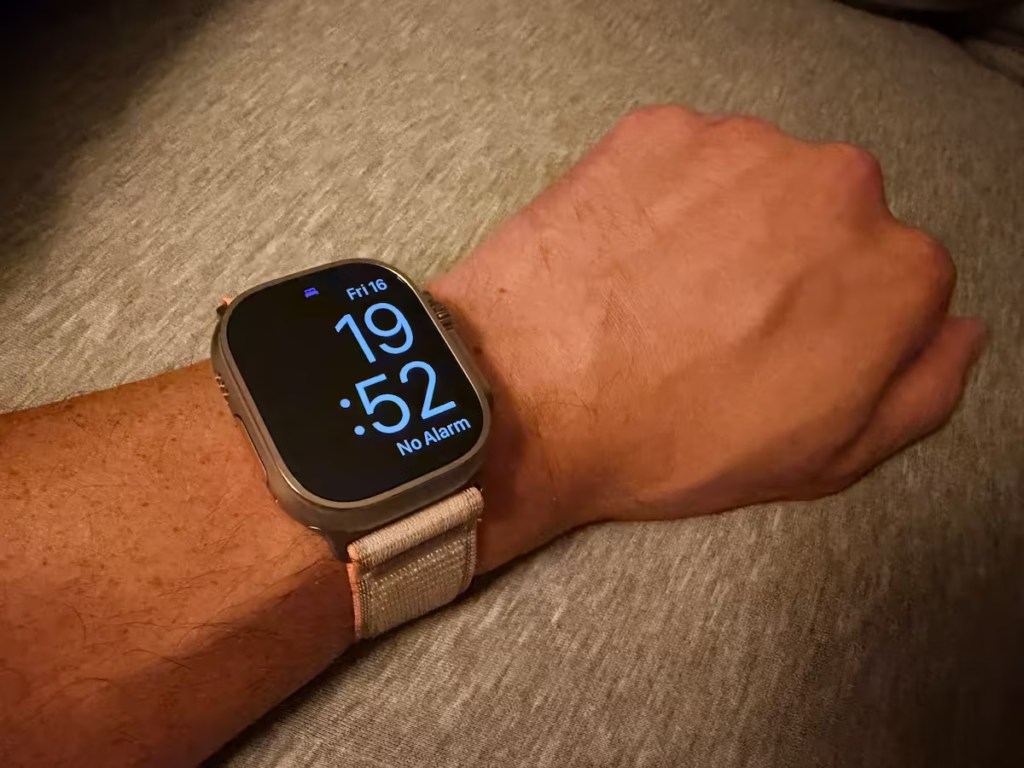
I kept a seven-night sleep and recovery log with the Apple Watch Ultra 4 for October 9–15, recording sleep duration, Sleep Score, recovery score, resting heart rate, how rested I felt, and bedtime-to-morning battery levels. The most useful finding was that a strong sleep or recovery score did not always mean I felt well rested. This is a week of personal observations, rather than a validation of sleep stages or a prediction of training performance.
Seven-Night Sleep Results
My recorded sleep averaged 7 hours and 8 minutes per night, ranging from 6 hours 20 minutes to 7 hours 41 minutes. Sleep Scores ranged from 80 to 97, averaging 88.7, while my own restedness ratings ranged from 1 to 5. Those scores looked more consistently favorable than I felt across the week.
| Morning | Recorded sleep | Sleep Score | Readiness score | Restedness |
|---|---|---|---|---|
| Oct. 9 | 7 hr 41 min | 97 | 4 | 4/5 |
| Oct. 10 | 6 hr 57 min | 87 | 6 | 5/5 |
| Oct. 11 | 7 hr 9 min | 87 | 8 | 4/5 |
| Oct. 12 | 7 hr 30 min | 97 | 3 | 3/5 |
| Oct. 13 | 6 hr 52 min | 92 | 7 | 1/5 |
| Oct. 14 | 7 hr 28 min | 80 | 7 | 3/5 |
| Oct. 15 | 6 hr 20 min | 81 | 8 | 2/5 |
Did Recovery Scores Match How I Felt?
October 13 was the clearest mismatch. After 6 hours and 52 minutes of recorded sleep, my Sleep Score was 92 and my recovery score was 7, but I rated my restedness just 1/5. On October 15, the recovery score was 8 after my shortest recorded night, yet I rated my restedness 2/5. In contrast, on October 10 I felt very rested at 5/5 after 6 hours and 57 minutes, with a recovery score of 6.
The two nights with a Sleep Score of 97 also had different recovery scores: 4 on October 9 and 3 on October 12. That is a useful reminder to read the metrics separately. In this small log, the numbers did not consistently move with my own restedness ratings. That does not establish that either score was wrong; it shows why I would not use a score alone to decide how hard to train.
My logged resting heart rate ranged from 51 to 58 bpm, averaging 54.7 bpm. The lowest value, 51 bpm, occurred on the morning I felt least rested. A lower number therefore did not automatically coincide with feeling better in this week.
Overnight Battery Use
The bedtime-to-morning battery drop averaged 9.1 percentage points, with a range of 6–15 points. I logged sleep results on all seven nights. That supports the practicality of tracking overnight across this week, although it does not establish that every individual sensor reading was captured.
| Morning | Bedtime battery | Morning battery | Drop |
|---|---|---|---|
| Oct. 9 | 80% | 71% | 9 points |
| Oct. 10 | 35% | 26% | 9 points |
| Oct. 11 | 25% | 18% | 7 points |
| Oct. 12 | 75% | 69% | 6 points |
| Oct. 13 | 44% | 37% | 7 points |
| Oct. 14 | 80% | 69% | 11 points |
| Oct. 15 | 38% | 23% | 15 points |
What This Week Can (and Cannot) Tell Me
This week tells me about everyday usefulness, not sleep-stage accuracy or whether the Ultra 4 can replace Whoop. I didn’t use a sleep-lab reference or record a same-night Whoop comparison, and I haven’t documented a training improvement caused by following Readiness.
My Sleep & Recovery Takeaway
Useful context, with limits. The seven-night log helped me follow sleep duration, but favorable sleep and recovery scores did not consistently mean I felt rested. I use them alongside fatigue and how a workout feels.
Why 7.5/10? Convenient overnight tracking earns its place in my routine, while the mixed recovery guidance limits its value. This provisional rating reflects everyday usefulness, not validated sleep accuracy or a demonstrated training improvement.
Sleep-log limitations: The October 14 entry has an unresolved timing discrepancy: 00:08–07:30 spans 7 hr 22 min, but the logged sleep duration is 7 hr 28 min. I have retained the recorded values rather than guessed a correction. The log also does not document the software version, the Readiness score scale, or whether I rated restedness before viewing the scores.
Battery Life & Charging
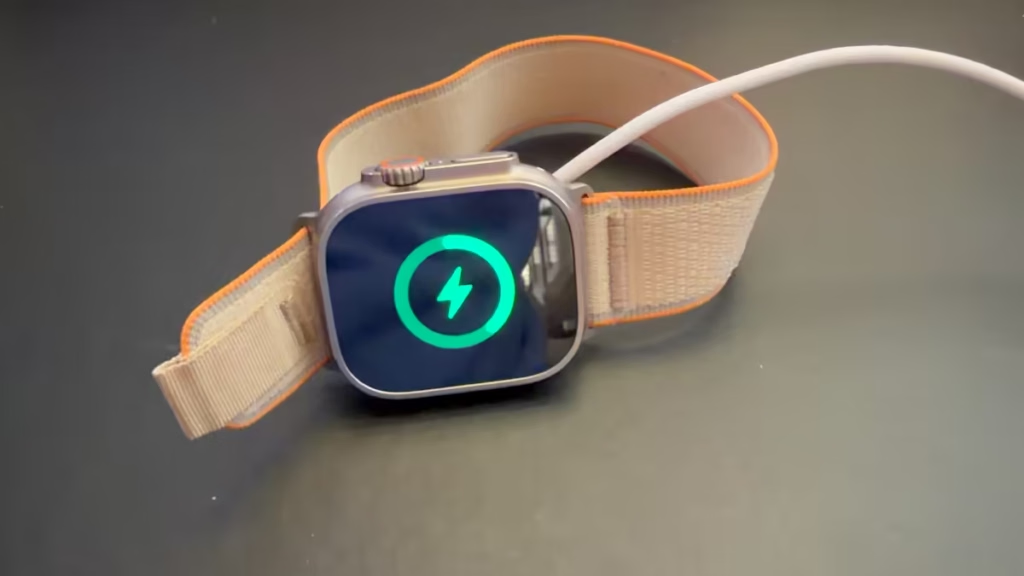
Battery life has been one of the biggest surprises of my Apple Watch Ultra 4 testing. My logged rundown reached 5% battery after 53 hours and 55 minutes from a full charge. I also had an earlier observation of approximately 72 hours with about 4–8% remaining and no charging top-ups.
Longer Battery Life in Everyday Use
For everyday usability, the multi-day battery life is a game changer and by far the biggest upgrade for me. I consistently got over two days on a single full charge, even with active daily use such as tracking multiple workouts and streaming music.
That’s significantly better than what I remember getting from my Ultra 2, which would last about a day at best in my use—even when it was brand new with 100% battery health. This is my experience across different periods of use, rather than a matched test of two new watches.
I use my Apple Watch for all of my training, so I care more about how it lasts through my routine than a headline battery specification. The improvement feels much bigger than the relatively small jump I noticed when I tested the Ultra 3 after using the Ultra 2.
I restored the Apple Watch Ultra 4 from a backup and kept my use broadly similar. My Ultra 2 had 85% battery health, so the current comparison is with a used watch, not two new batteries. Battery age, software, and settings could account for part of the improvement.
Long Training Days on LTE
A long training day for me can include more than four hours of workout tracking, along with LTE use, music streaming, calls, and Siri requests. My previous watch could be nearly out of battery by the end of that kind of day. The Ultra 4 has felt significantly more comfortable to rely on for those long sessions, which is where I have noticed the improvement most.
I was initially tempering my expectations because I wondered whether the always-listening Siri feature would add battery drain. I have not noticed an obvious penalty in my everyday use so far. I have not isolated Siri’s power consumption, though, and this observation covers only the features available to me during the review.
My theory is that more efficient sensors, changes in watchOS 27, or a combination of improvements could be contributing. I cannot identify the cause from these tests. What I can say is that the extra time between charges has been a much more noticeable improvement than I expected.
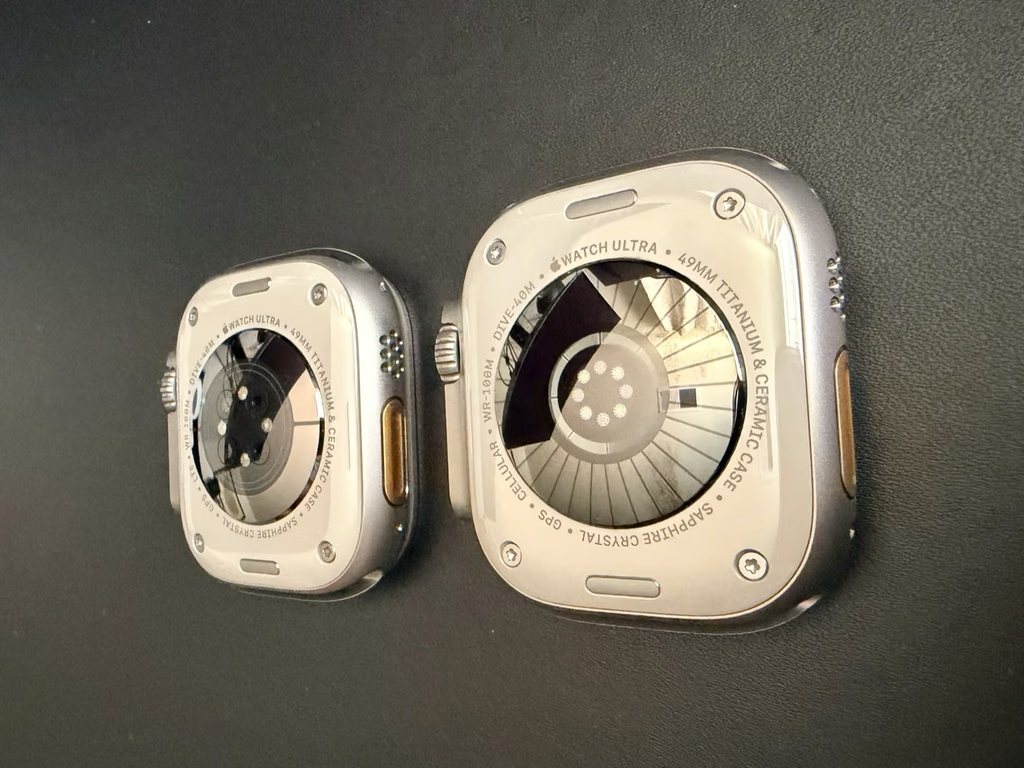
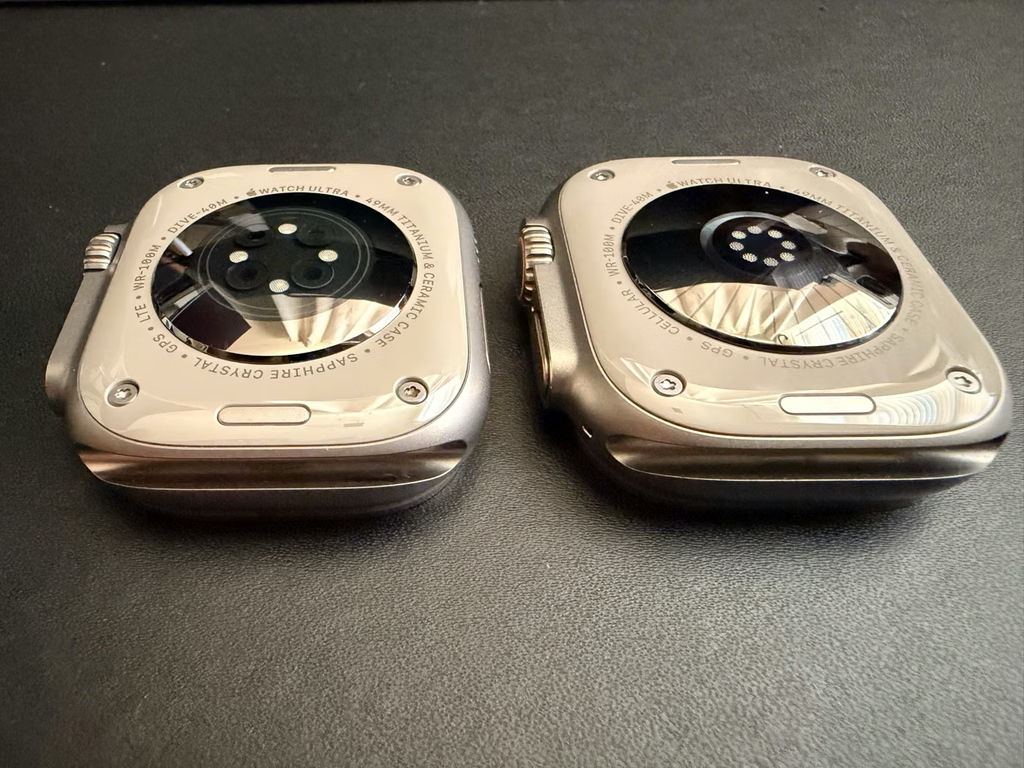
The photos below show the backs of my Ultra 2 on the left and Ultra 4 on the right. The visible sensor-window arrangement is different, which is why sensor efficiency is one possibility I am considering.
Charging Top-Ups in My Routine
Outside the uninterrupted 72-hour test, I usually put the Ultra 4 on the charger while I shower. Those short charging windows have been convenient for topping it back up to around 50% and keeping it ready for the next part of my day.
With my Ultra 2, I remember waiting about an hour for a 20%–80% charge. That wasn’t a matched test, so I’m using the timed Ultra 4 results below rather than claiming an exact charging-speed improvement.
Timed Charging Test: 10% to 100%
I timed a charging session starting at 10%, using the charging cable and puck included with my Apple Watch Ultra 4 and my power adapter. It reached 50% in 22 minutes, 80% in 47 minutes, and 100% in 76 minutes.
| Battery level | Time of day | Time on charger |
|---|---|---|
| 10% (start) | 8:46 AM | 0 min |
| 30% | 8:56 AM | 10 min |
| 50% | 9:08 AM | 22 min |
| 70% | 9:24 AM | 38 min |
| 80% | 9:33 AM | 47 min |
| 90% | 9:45 AM | 59 min |
| 100% | 10:02 AM | 76 min (1 hr 16 min) |
My charging takeaway: Starting at 10%, a 22-minute top-up got me back to half a battery, while reaching 80% took less than an hour. The final stretch from 80% to 100% took another 29 minutes. For my routine, the useful result is how much charge I can recover without waiting for a full charge.
Battery Rundown Test: 100% to 5%
After the charging test above reached 100% at 10:02 AM, I tracked the battery level over the next three calendar days. Using that full-charge time as the starting point, I recorded 10% remaining after 51 hours and 20 minutes and 5% remaining after 2 days, 5 hours, and 55 minutes (53 hours and 55 minutes total).
| Day | Time | Battery left | Elapsed time |
|---|---|---|---|
| Day 1 | 10:02 AM | 100% | Start |
| Day 1 | 1:12 PM | 99% | 3 hr 10 min |
| Day 1 | 7:25 PM | 87% | 9 hr 23 min |
| Day 1 | 10:00 PM | 80% | 11 hr 58 min |
| Day 2 | 8:00 AM | 69% | 21 hr 58 min |
| Day 2 | 10:30 PM | 38% | 36 hr 28 min |
| Day 3 | 8:41 AM | 23% | 46 hr 39 min |
| Day 3 | 1:22 PM | 10% | 51 hr 20 min |
| Day 3 | 3:57 PM | 5% | 53 hr 55 min (2 days, 5 hr 55 min) |
My rundown takeaway: This logged run delivered nearly 2¼ days of use with 5% battery remaining: 2 days, 5 hours, and 55 minutes in total. Although it spanned three calendar days, it was not a 72-hour result. It was shorter than my earlier approximately 72-hour observation.
How I Put the Battery Improvement in Context
I still would not put this in the same category as the endurance I expect from a dedicated Garmin, Suunto, or COROS sports watch. If you are used to going a week between charges, 2-3 days may not sound exciting. For someone coming from an older Apple Watch, though, this improvement has made a real difference in my routine.
For me, the appeal is having workout tracking alongside calls, streaming music, payments, and the other smartwatch functions I use. I would describe the Ultra 4 as a smartwatch that fits my training routine, while a dedicated sports watch may be the better fit when going much longer between charges is the priority.
My Battery Takeaway
More than two days in the logged rundown: 53 hours and 55 minutes, with 5% remaining. That is the documented result; the earlier approximately 72-hour observation was a separate run. Convenient top-ups make the extra endurance useful in my daily routine.
Why 9.0/10? Battery life is my standout improvement. The rating remains provisional because I have not repeated the rundown under matched conditions or timed a controlled charging comparison. My older Ultra 2’s 85% battery health also limits the comparison.
Apple Watch Ultra 4: Comfort & Everyday Use
Coming from the Ultra 2 after wearing it for a couple of years, I felt no noticeable difference with the Ultra 4 on my wrist. But if you’re coming from a regular Apple Watch, its size and weight may take some getting used to.
Getting Used to the Size & Weight
I know a lot of people have a hard time adjusting to the Ultra’s size at first, especially if they’re coming from a regular Apple Watch. But I’ve also heard from people who get used to it after wearing it for a little while.
That’s been my experience, too. I really don’t notice it on my wrist anymore. During the short time it’s off my wrist, it actually feels weird not to have it there.
I do like the big screen and the robust feel of the Ultra 4. It takes away some of the worry I’d have about damaging a smaller smartwatch, including a regular Apple Watch.
At the end of the day, though, it may still be too large or thick for some people. Its boxier, taller case can feel more noticeable under clothing or during certain activities than a thinner watch.
Sleeping with the Ultra 4
It can feel a little weird sleeping with it at first, especially if you’re not used to wearing a watch to bed. For me, I got used to it after a little while.
I actually like having it on my wrist as an alarm clock. The silent vibration is something I prefer to an audible alarm, and I can see why people who sleep with a partner would like it, too.
On the other hand, I can understand why some people find the Ultra too uncomfortable to sleep in. I’ve heard of people switching to a smaller, regular Apple Watch at night to track their sleep instead.
Trail Loop Comfort & Band Fit
The Trail Loop band is super comfortable on my wrist. I prefer its feel to silicone, especially when sleeping.
But I will admit that the Trail Loop takes longer to dry out when I get sweaty during a workout. I tighten the watch a little while training to keep it from flopping around and help maintain good sensor contact. The downside is that sweat and moisture can get trapped under the band, and I’ve noticed some skin irritation after sweaty workouts.
So I usually take the watch off for a little while afterward to let my wrist and the band dry. Comfort during the workout is one thing; leaving a damp band on afterward is another.
I recommend keeping the watch, band, and your skin clean and dry, especially if you’re a heavy sweater. For cleaning, I’d follow Apple’s instructions for the watch and your specific band: fresh water for the watch when needed, and a nonabrasive, lint-free cloth lightly dampened with fresh water for the Trail Loop. Let everything dry before putting it back on.
Fit matters, too. Wearing the watch too low on your wrist or using a poorly fitting band can make it uncomfortable. I’d pay attention to the position and band fit before deciding whether the Ultra’s size works for you.
Apple Watch Display, Controls & Phone-Free Use
Apple Watch Display & Watch Faces
I like choosing a watch face with complications that put the information I need at a glance. This applies to Apple Watches in general, but having a clear, easy-to-read display is a big part of the everyday appeal for me.
Leaving My iPhone in the Gym Locker
I use cellular service on my Apple Watch Ultra 4, and it’s become almost like my second “dumb phone.” It’s nice not to be so reliant on my iPhone or feel like I need it attached to me all the time.
I put my iPhone in the gym locker and use the watch to stream music or listen to a podcast while I’m working out, while also tracking the workout. It’s very freeing and less distracting when I’m trying to train.
It’s also nice when I want to go on a short walk or run to the store really fast. I don’t have to carry my iPhone with me every time. The longer battery life gives me more confidence that the watch will last while I’m out and about using it by itself.
Health Sensing & Fitness Tracking in One Watch
I wear an Apple Watch largely for its health sensing and fitness features. Having heart rate, HRV, and activity information conveniently on my wrist is a big part of its everyday value.
I still think a chest strap like the Polar H10 is the better reference when I want to check heart rate closely, especially when it rises quickly during high-intensity intervals. My testing has also shown why matching workout averages doesn’t tell the whole story.
But for everyday use, the convenience of having tracking, music, and other useful features together on my wrist is what really sets it apart for me.
Checking Workout Metrics on My Wrist
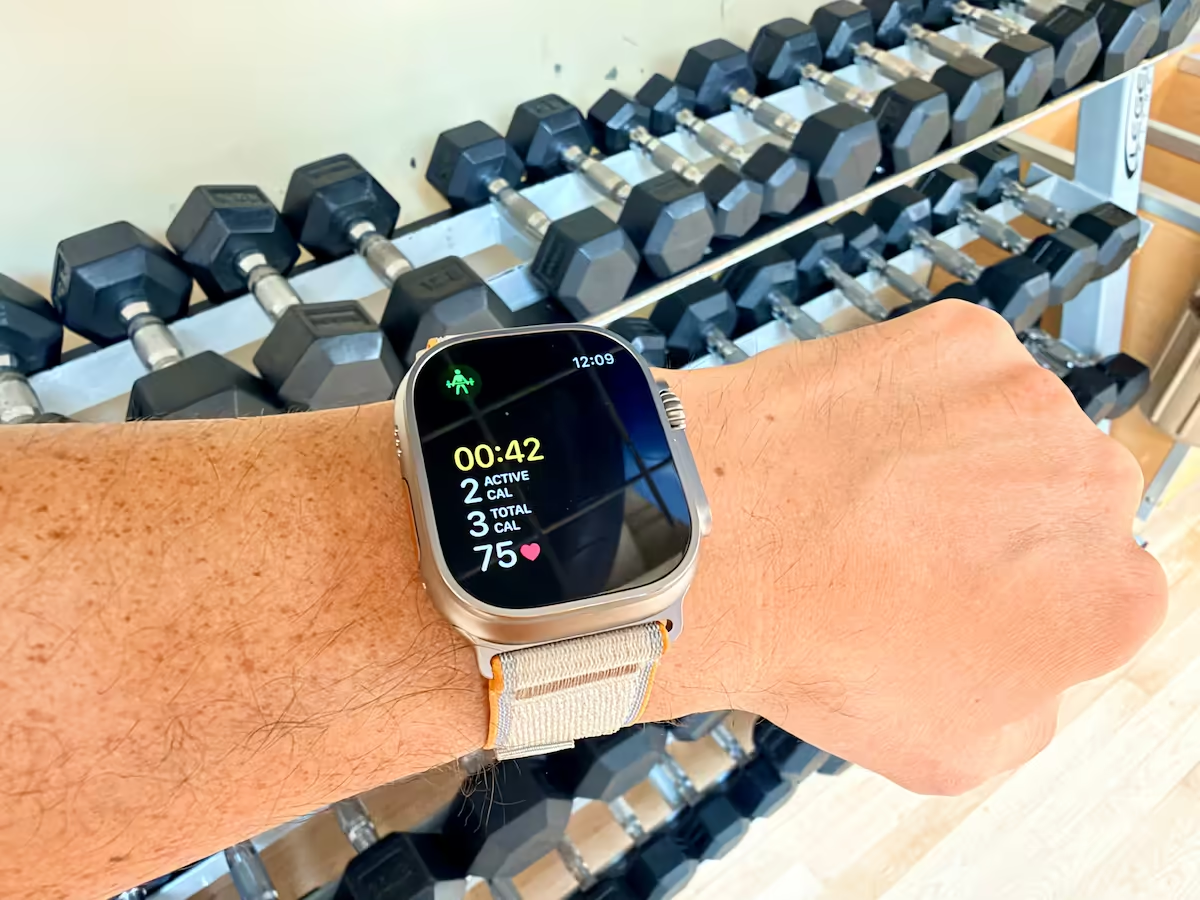
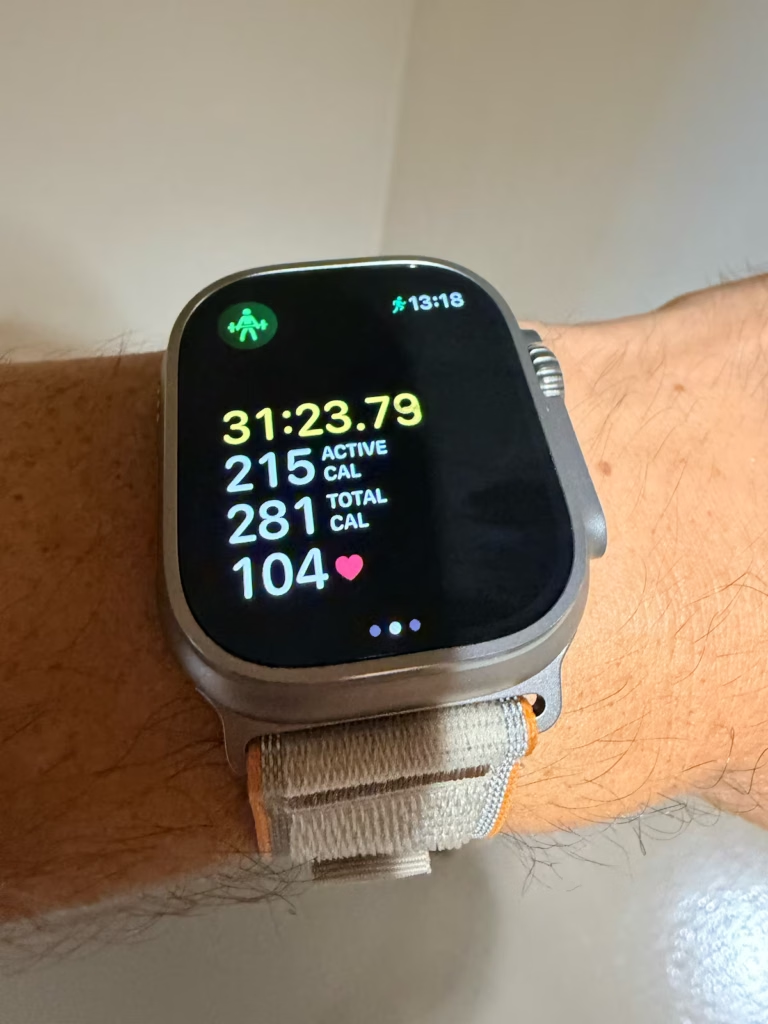
The Apple Watch Ultra 4 workout screen puts elapsed time, active calories, total calories, and the current heart-rate reading together. This photo near the end of my strength session shows the layout I checked on my wrist; the 104 bpm reading is the current heart rate, rather than the workout average.
Siri feels more capable now, but it can still be very, very slow. Simple timer requests have taken around 10–15 seconds in my recent use, and I’ve also had longer waits of 30-plus seconds for simple requests during this review. Setting a timer used to feel almost instantaneous. I suspect software is part of the problem, but I haven’t confirmed whether the delay comes from the watch, my iPhone, or cloud processing.
Rise to talk. When you lift your wrist up to talk, it’ll not register me talking or giving it commands. This is definitely embarrassing for Apple, but also something that they need to fix. Because nobody wants to wait around for 30 seconds just to set a timer through Siri on your expensive Apple Watch.
Using the Watch Display with Sweaty Hands
Sweaty hands can definitely make the Ultra 4 touchscreen less responsive in my experience. I find myself having to wipe my fingers on my clothes to dry them off really fast before using the screen during a workout.
It’s nice having physical controls so I don’t have to rely on the touchscreen for everything. I’d still like more ways to navigate without touching the screen when moisture gets in the way, whether that’s sweat during a workout or rain outside.
Why I Like the Action Button
The Action button and Digital Crown are essential for me during workouts when my hands are sweaty. I like having a customizable Action button that gives me quick access to functions without having to tap through the screen.
My Comfort and Everyday Usability Takeaway
- Comfortable for me, but the size matters. I’m used to the Ultra and barely notice it during daily wear. The Trail Loop feels great, including overnight, but the bulky case won’t suit every wrist or sleeping preference.
- Leaving my phone behind is a big plus. Music, workout tracking, and useful information on my wrist make it easier to leave my iPhone in the gym locker. The longer battery life makes that convenience easier to rely on.
- Physical controls earn their place. The Action button and Digital Crown are especially useful when sweat makes the touchscreen harder to use. I’d still like more ways to navigate without touching the screen.
- The frustrations are hard to ignore. Slow Siri responses and missed voice commands interrupt the experience. The Trail Loop also holds moisture after workouts, so I take it off to let my wrist and band dry.
Why 8.0/10? The Ultra 4 fits my everyday routine really well, and I enjoy wearing it. But the Siri issues, sweaty-screen limitations, and size and band compromises keep me from giving it a higher score.
Should You Upgrade for the Heart-Rate Sensor?
I wouldn’t upgrade for the heart-rate sensor alone. The workout comparisons showed close averages, but no clear accuracy leap over my Ultra 2. During intervals, I still noticed the displayed reading lag as effort rose and fell. For quick changes, I’d continue using my Polar H10; for everyday training, I value the convenience of wrist tracking.
More frequent HRV information and readiness feedback give me useful context, but I haven’t independently validated the HRV measurements. Resting and everyday readings have felt consistent, although I haven’t separately checked them against a reference. More data alone doesn’t establish better accuracy.
If you already own an Ultra 3, I’d want clearer improvement in interval responsiveness before paying for the sensor upgrade. Coming from an Ultra 1 or 2, the overall package may be more appealing; my buying advice below explains where battery life and convenience make the difference for me.
Heart-Rate Alerts & Everyday Comfort
I also see real value in having high and low heart-rate notifications on my wrist. An alert that prompts someone to get a problem checked could make a big difference. These features aren’t a guarantee that every problem will be caught, though, and Apple says the Watch cannot detect heart attacks.
I’ve heard some users mention warmth or skin irritation and wonder whether more frequent measurements are involved. I may have noticed a little warmth myself, but nothing significant enough to irritate my skin or make me want to stop wearing it.
Apple Watch Ultra 4 Build Quality & Durability
Titanium, Sapphire & Everyday Peace of Mind
I like the titanium… not just how it looks, but how light the watch feels to me for its size. It still has that big, robust Ultra feel without feeling as heavy on my wrist as its size might suggest.
The sapphire glass also gives me some peace of mind about everyday bumps and scratches. I worry less about knocking the watch around during daily use.
Is Apple Watch Ultra 4 Worth It? Price & Upgrade Advice
What the Premium Buys
For me, the value comes from the combination of longer battery life, a faster and smoother everyday feel, and having health and fitness information conveniently on my wrist. The battery is the standout. Getting two-plus days in my use makes a much bigger difference than a feature I might only use occasionally.
If you’re comparing fitness trackers, consider whether you’ll actually use the extra smartwatch functions. For me, calls, music streaming, and payments from my wrist help justify the price. If you mainly want activity tracking, those extras may not be worth paying for.
I also appreciate the more frequent health information and readiness feedback. If you’re into fitness and like following those trends, that can add to the appeal. But I wouldn’t put a dollar value on a promised jump in sensor accuracy that my own tests haven’t established.
Coming from an Ultra 1 or Ultra 2
I think the Apple Watch Ultra 4 is a worthy upgrade if you want better battery life and a more responsive everyday experience. My firsthand comparison here is mainly with my Ultra 2, which still did well and met my needs. I didn’t have to replace it, but I very much appreciate the difference now that I have.
Getting the 2-3 days of battery life with the Ultra 4 coming from the Ultra 2 is an absolute gamechanger. I also really liked the improved more frequent heart rate and HRV readings. The Readiness score is also useful even if not always an accurate reflection.
For Ultra 1 owners, I’d also see more reason to consider the upgrade than I would for someone already wearing an Ultra 3.
Coming from an Ultra 3
This is where I’d think harder about the cost. The Ultra 4 may feel like a smaller upgrade, and I’m not sure I’d recommend paying for it unless you specifically want the new features or just like having the latest and greatest.
A good discount and a trade-in offer could make it more appealing. I’d look at the actual amount you’d have to pay after the trade-in and decide whether the improvements matter enough in your daily routine. I wouldn’t assume everyone coming from an Ultra 3 will feel the same jump I did from my older watch.
My Value Score: 8.0/10. Worth the cost for my routine, but harder to justify when your existing watch already meets your needs.
Buy It If
- You’re coming from an Ultra 1 or Ultra 2 and want more time between charges.
- You’ll use the watch’s fitness information, calls, music, and other everyday conveniences.
- The price works for you after considering any discount or trade-in offer.
Skip It If
- Your Ultra 3 already meets your needs.
- Your Ultra 2 still suits your routine and its battery lasts long enough.
- Your main reason to upgrade is a proven leap in heart-rate accuracy. My tests do not establish that.
- More time tracking. Less time charging.
- 2+ days of battery life in my testing, with fast charging top-ups.
- Useful workout, sleep, and recovery insights.
- Calls, music, and payments from your wrist.
- Best for iPhone users upgrading from an older Apple Watch.
Trainer Josh Score
My overall Trainer Josh Score is 8.0/10. The Ultra 4’s battery life and everyday convenience are the strongest parts of the experience for me. Heart-rate lag during intervals, the elliptical step-count limitation, mixed recovery guidance, and Siri frustrations keep it from scoring higher.
| Category | Score | Weight |
|---|---|---|
| Workout Tracking & Accuracy | 7.5/10 | 30% |
| Sleep & Recovery | 7.5/10 | 20% |
| Battery Life & Charging | 9.0/10 | 20% |
| Comfort & Everyday Usability | 8.0/10 | 15% |
| Value | 8.0/10 | 15% |
| Overall Trainer Josh Score | 8.0/10 | 100% |
The weighted total is 7.95, rounded to 8.0/10. Scores use a 1–10 scale. This is my rating of the overall experience, not an accuracy percentage. It reflects the testing completed so far; the category scores marked provisional can still change as I finish the remaining checks.
How I Tested Apple Watch Ultra 4
My independent testing focused on everyday training use: heart-rate comparisons with the Polar H10, step-count trials, an outdoor GPS run, a seven-night sleep log, and timed battery and charging checks. I used my Ultra 2 for the watch comparisons described above. The individual sections explain the recording methods, results, and limitations of each test.
Testing Limitations
These are my results as one person across a small number of sessions. The comparisons use workout summaries and screenshots, not a synchronized analysis of every heart-rate sample. My calorie estimates and sleep stages weren’t checked against laboratory measurements, and this review doesn’t establish long-term durability. Similar numbers show agreement between devices, not proof that either one is perfectly accurate.